A Step-by-Step Guide to How Meta Secures Your Encrypted Backups
Introduction
End-to-end encrypted backups ensure that your private messages remain accessible only to you, even if cloud storage or Meta's servers are compromised. Meta has built a robust infrastructure for WhatsApp and Messenger based on the HSM-based Backup Key Vault. This guide walks you through the key steps Meta takes to protect your backup recovery codes and maintain transparency about the security of its hardware security module (HSM) fleets.
What You Need
- Basic understanding of end-to-end encryption concepts (public/private keys, session establishment).
- Familiarity with hardware security modules (HSMs) – tamper-resistant devices that safeguard cryptographic keys.
- Access to Meta's whitepaper (see Tip section below) for deeper technical details.
Step-by-Step Process
Step 1: Deploy the HSM-based Backup Key Vault
Meta's foundation is a geographically distributed fleet of HSMs organized into a Backup Key Vault. This vault stores your recovery code (used to restore your message history) in a way that is inaccessible to Meta, cloud providers, or any third party.
- Tamper-resistant hardware: Each HSM is physically and logically protected so that the recovery code cannot be extracted.
- Majority-consensus replication: The vault spans multiple data centers. To read or modify a recovery code, a majority of HSMs must agree, ensuring high availability and security.
Step 2: Enable Over-the-Air Fleet Key Distribution (for Messenger)
To verify that clients are communicating with a genuine HSM fleet, public keys must be authenticated. In WhatsApp these keys are hardcoded in the app, but Messenger requires a more flexible approach.
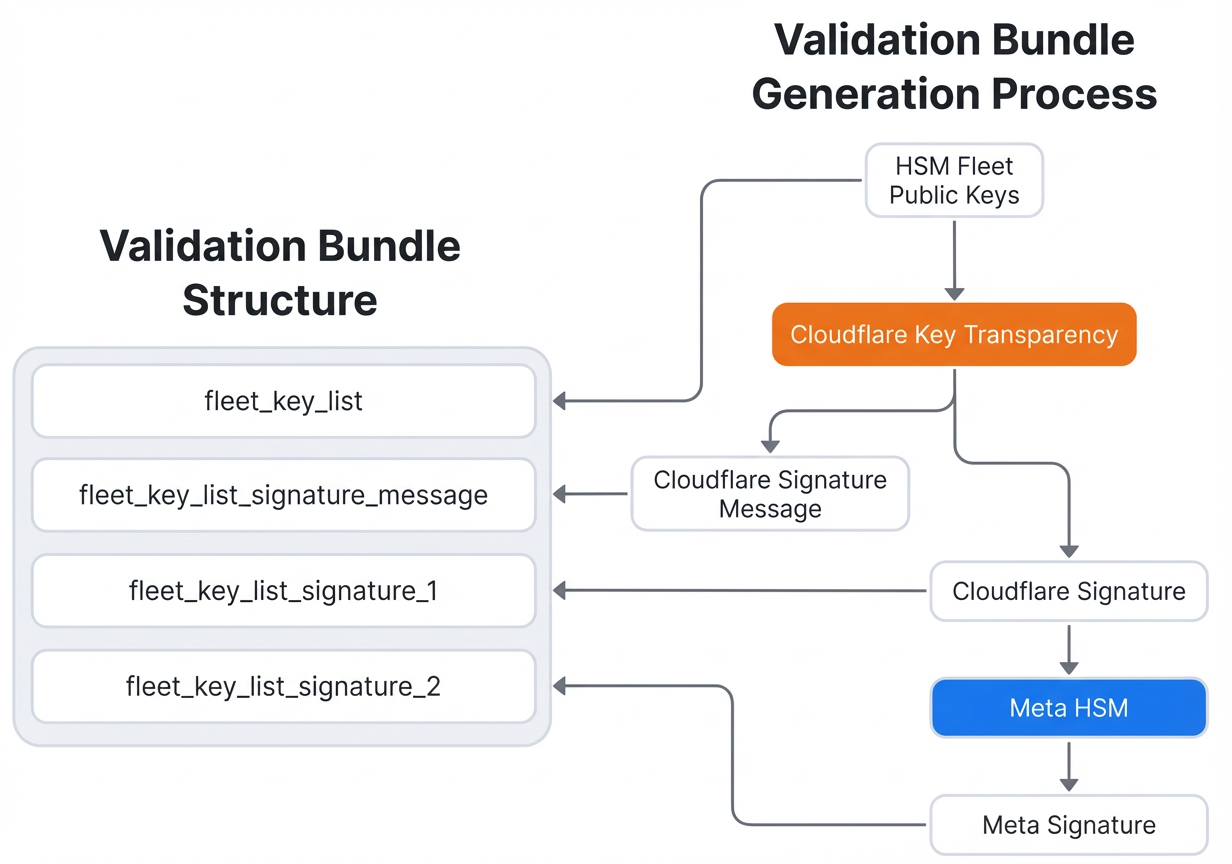
- Generate validation bundle: When a new HSM fleet is deployed, a fleet public key is bundled with a signature from Cloudflare (the independent auditor) and a counter-signature from Meta.
- Deliver bundle over the air: The validation bundle is sent to Messenger clients as part of the HSM response, eliminating the need for an app update.
- Client verification: The Messenger client verifies the bundle's signatures to confirm that the fleet key is genuine and has been audited.
- Audit log maintained: Cloudflare retains a cryptographic audit log of every validation bundle, providing independent proof of authenticity.
Step 3: Publish Evidence of Secure Fleet Deployment
Meta commits to transparency by publishing evidence for each new HSM fleet deployment on its engineering blog.
- Infrequent deployments: New fleets are typically added only every few years.
- Verifiable proof: The published evidence includes cryptographic attestations that the fleet was deployed securely, following the procedures described in Meta's whitepaper.
- User-verifiable: Anyone can follow the audit steps in the whitepaper to independently verify that the deployment matches the claims – see Tip 2 below.
Step 4: Enable User Verification of Fleet Authenticity
As a user, you can confirm that your backup is protected by a legitimate HSM fleet. This step is crucial for those who want to audit Meta's system.
- Obtain the fleet public key: From the published evidence or directly from the client-server interaction.
- Check the validation bundle: Ensure the bundle is signed by Cloudflare and counter-signed by Meta.
- Compare with the audit log: Cloudflare's audit log records every bundle; you can request verification (details in the whitepaper).
- Validate the HSM attestation: Use the hardware attestation mechanisms built into the HSMs to confirm they are genuine devices.
Tips for Deeper Understanding
- Read the official whitepaper: Meta's whitepaper, "Security of End-To-End Encrypted Backups," contains the complete technical specification, including the validation protocol and audit procedures.
- Follow the audit steps: Any user can independently verify a fleet deployment by following the instructions in the audit section of the whitepaper. This ensures you don't have to trust Meta blindly.
- Stay updated on new fleet deployments: Bookmark the Engineering at Meta blog to see when new HSM fleets are announced with attached evidence.
- Use passkeys when possible: Meta recently made it easier to end-to-end encrypt backups with passkeys – consider switching for simpler recovery.
Related Articles
- Canonical Under Cyber Siege: Ubuntu Sites, Snap Store, and Launchpad Hit by Sustained Attack
- Zero Trust Access for Windows: HashiCorp Boundary and Vault Eliminate Static Credential Risks
- April 2026 Patch Tuesday: Record Number of Fixes Including Actively Exploited Zero-Days
- A Step-by-Step Guide to Strengthening End-to-End Encrypted Backups with HSM-Based Key Vault
- Automate Exposure Validation to Outpace AI-Driven Attacks: A Step-by-Step Guide
- Unmasking the OceanLotus PyPI Supply Chain Attack: ZiChatBot Malware Explained
- Unmasking Silver Fox: New ABCDoor Backdoor Targets Tax Authorities in Russia and India
- Ransomware Attack on Foxconn Exposes Apple Data: Manufacturing Sector Under Siege