Securing Windows Access: How Boundary and Vault Eliminate Static Credentials and VPN Risks
Many organizations still rely on outdated practices like static passwords and VPN-based network access to manage Windows environments. These methods create significant security gaps, including credential exposure and uncontrolled lateral movement. By combining HashiCorp Boundary with Vault, teams can replace static credentials with dynamic, just-in-time secrets and shift from network-level access to identity-based, user-to-resource connections. This Q&A explores the problems and solutions in detail.
Why are static credentials still a major problem in Windows environments?
Despite modern identity tools, many organizations continue to use static credentials for Windows servers and workstations. Common examples include shared local administrator accounts, long-lived domain accounts, service accounts with fixed passwords, and manually provisioned privileged credentials. These credentials often remain unchanged for months or even years because manual rotation is cumbersome and rarely automated. This persistence dramatically increases the risk of credential theft—shared accounts especially are reused across sessions and for remote desktop (RDP) access, troubleshooting, and break-glass scenarios. Once compromised, an attacker can use the same static password to move laterally or escalate privileges. Even with multi-factor authentication at login, the underlying static credential model remains a weak link that CISOs, DevOps, and security teams cannot ignore.
How does traditional VPN access create broad exposure?
Traditional VPNs follow a castle-and-moat approach: once inside the network perimeter, users often have overly broad access. While VPNs securely connect remote users, they do not inherently limit lateral movement. Access controls typically rely on IP addresses via firewalls, security groups, or network segmentation. In dynamic cloud environments, IP addresses change frequently, making these rules brittle and hard to maintain. To restrict access further, organizations may deploy additional tools, leading to operational sprawl. The core issue is that VPNs solve connectivity, not fine-grained, identity-based access control. Users authenticated via VPN can often reach many more resources than necessary, increasing the blast radius in case of compromise. This is a pressing challenge for organizations seeking to modernize their security posture.
How do Boundary and Vault together solve credential and access issues?
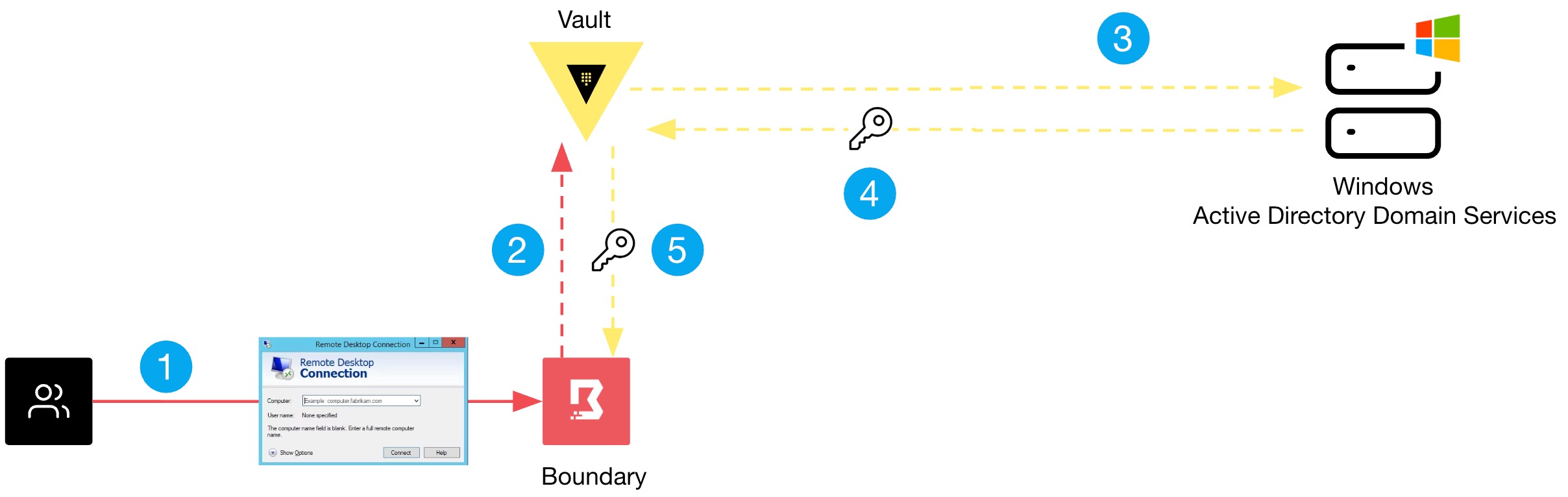
Boundary fundamentally changes the model by combining authentication and authorization into a single platform. Instead of granting broad network access, it provides direct, session-based access between a user and a specific target resource—identified by the user's unique identity. Vault complements Boundary by managing credentials dynamically. Rather than storing static passwords, Vault generates short-lived, just-in-time secrets for each session, automatically rotating them after use. This eliminates the need for long-lived static credentials. Together, Boundary and Vault ensure that users connect only to approved resources, with credentials that are valid only for that session. This approach drastically reduces the risk of credential exposure and lateral movement, giving teams a scalable, identity-centric solution for Windows environments.
What is the difference between network-level access and identity-based access?
Network-level access, typical of VPNs, grants users entry to the entire internal network. Access decisions are based on IP addresses, not who the user is. This makes it difficult to enforce least privilege—users often can reach servers they don't need. In contrast, identity-based access ties permissions directly to the authenticated user. For example, when using Boundary, a user's request to connect to a specific Windows server is evaluated against their identity, role, and policy—not their IP or network segment. This approach works in dynamic environments where IP addresses change, because access is tied to the user, not the network. Identity-based access also enables fine-grained auditing of exactly who accessed which resource, when, and for how long, providing a clear trail for compliance and incident response.
How does Boundary automatically handle credential management?
Boundary integrates with Vault to manage credentials on the user's behalf. When a user initiates a session to a Windows target, Boundary requests a temporary credential from Vault—for example, a local administrator password or a domain account token. Vault generates this credential dynamically, applies it to the target, and then automatically rotates or revokes it after the session ends. The user never sees the static password; they are authenticated through Boundary's session proxy. This eliminates risky behaviors like password sharing or storing credentials in scripts. Operators retain full control over credential lifecycle policies, and each session uses a unique, ephemeral credential. This automated, just-in-time approach significantly reduces the window of exposure for static credentials and simplifies compliance with rotation requirements.
What are the key steps to implementing Boundary with Vault for Windows access?
Implementation involves several stages. First, deploy and configure Vault as the secrets backend, enabling a secrets engine that can generate Windows credentials (e.g., using Active Directory or local accounts). Second, set up Boundary with a target for each Windows resource and attach a credential store that points to Vault. Third, define roles and policies in Boundary to map users or groups to specific targets—granting access only to necessary servers. Fourth, create IAM or OIDC authentication methods in Boundary so users authenticate via existing identity providers. Finally, connect Boundary to Vault via its credential-brokering capability. Users then request access through the Boundary client or web UI, and Boundary transparently brokers the Vault credential for the session. Testing with a small set of targets helps validate the workflow before scaling across the environment.
Related Articles
- 8 Essential Defenses Against BRICKSTORM Malware in vSphere Environments
- 7 Key Shifts in Europe's Cyber Extortion Landscape: Why Germany Has Become the Prime Target
- April 2026 Patch Tuesday: 5 Urgent Security Fixes You Can't Afford to Miss
- Stealthy Python Backdoor DEEP#DOOR Targets Browser and Cloud Logins via Tunneling Service
- The Anatomy of an Amazon SES Phishing Campaign: A Step-by-Step Guide for Attackers
- Weekly Cyber Threat Digest: May 4th – Major Breaches, AI-Powered Attacks, and Critical Patches
- OpenAI Unveils Daybreak: AI Security Initiative Countering Anthropic's Claude Mythos
- When AI Finds Flaws in Minutes: The Race to Fortify Digital Defenses