Modern Access Control for Windows: How Boundary and Vault Eliminate Static Credentials and Network Sprawl
Organizations running Windows environments continue to struggle with two persistent security challenges: the over-reliance on static credentials and the overly broad network access granted by traditional VPNs. These issues expose critical infrastructure to lateral movement, credential theft, and compliance risks. Fortunately, HashiCorp Boundary and Vault provide a modern alternative that combines identity-based access with dynamic credential management. This article explores the problems, the solution, and a configuration path for implementation.
The Persistent Challenge of Static Credentials
Despite decades of progress in secrets management, many enterprises still rely on long-lived, static passwords to access Windows servers and workstations. Common examples include:
- Shared local administrator accounts – often identical across multiple machines
- Long-lived domain accounts – used for routine administration but rarely rotated
- Service accounts with fixed passwords – embedded in scripts or configuration files
- Manually provisioned privileged credentials – created for break-glass scenarios and forgotten
Without automated rotation, these credentials can remain valid for months or even years, increasing the attack surface. Even when multi-factor authentication (MFA) is in place, the underlying static password creates a single point of failure. In Windows environments, shared administration accounts are especially common for Remote Desktop Protocol (RDP) access, troubleshooting, and emergency break-glass procedures, further elevating exposure risk. CISO, DevOps, and security teams must recognize this as a critical vulnerability.
Why VPNs Fall Short in Modern Environments
Many organizations adopt a traditional castle-and-moat strategy, securing the perimeter with a VPN. While VPNs provide encrypted tunnels into the network, they often grant broad network-level access that makes lateral movement easy for attackers. Firewalls, security groups, and network segmentation attempt to limit access but rely on IP addresses rather than user identity. This approach becomes brittle in dynamic cloud and hybrid environments where IPs change frequently.
Deploying additional micro-segmentation tools leads to operational sprawl and management complexity. The core issue remains: VPNs solve connectivity, not fine-grained access control at the user-to-resource level. Organizations need a solution that addresses both the credential problem and the access problem simultaneously.
A Unified Solution: Identity-Based Access with Boundary
HashiCorp Boundary fundamentally changes the access model by combining authentication and authorization onto a single platform. Instead of granting broad network access, Boundary provides direct connectivity between an authenticated user and a specific target resource based on the user's identity, group membership, and contextual policies.
Key capabilities include:
- Session-based, just-in-time access to Windows machines via RDP or SSH
- Credential brokering that never exposes static passwords to the user
- Audit logging and session recording for compliance
- Integration with existing identity providers (LDAP, OIDC, SAML)
Dynamic Credential Management with Vault Integration
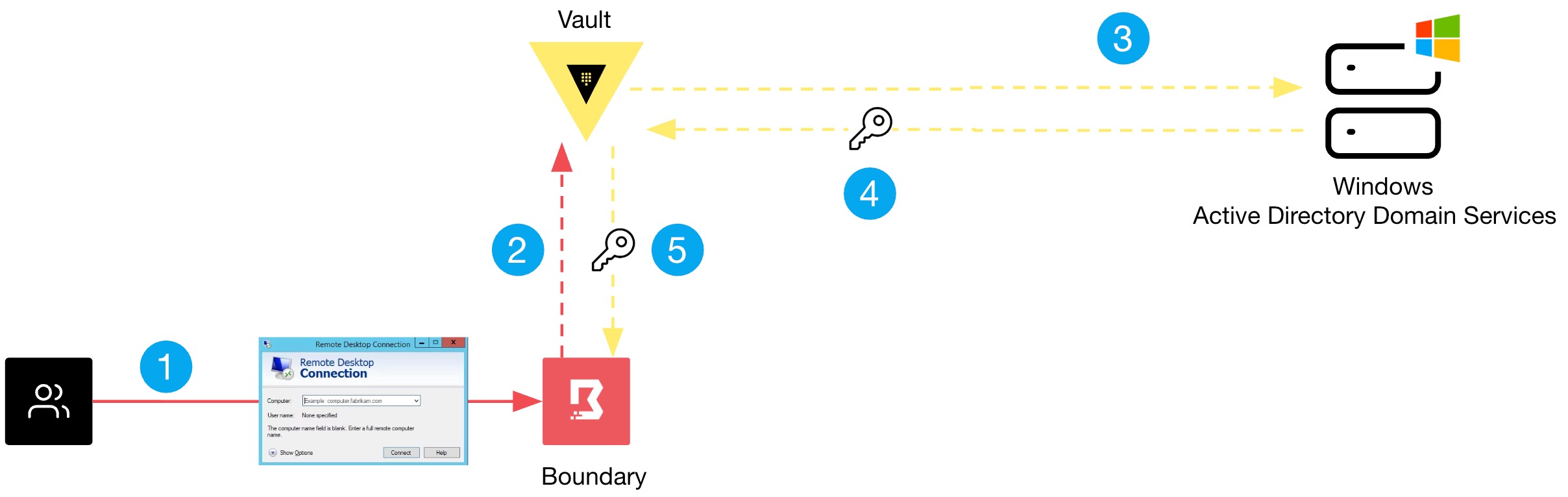
Boundary integrates natively with HashiCorp Vault to eliminate static credentials entirely. When a user requests access to a Windows target, Boundary can request Vault to generate a dynamic, short-lived credential (e.g., a temporary local admin password or a domain account with just-enough administration). The credential is automatically rotated after the session ends, reducing the window of exposure to minutes instead of months.
This approach supports:
- Local admin accounts – Vault can generate unique passwords per session
- Domain accounts – with time-bound group membership via Active Directory integration
- Service accounts – replaced on-the-fly for automated tasks
Administrators no longer need to manually rotate passwords or store them in insecure locations. The combination of Boundary and Vault delivers a zero-standing-privileges model for Windows access.
Configuration Overview for Windows Targets
To test this solution, follow these high-level steps. Detailed guides are available in the official documentation.
- Deploy Boundary – Install the controller and worker nodes in your environment. Configure authentication (e.g., OIDC with Azure AD or Okta).
- Set up Vault – Enable the Active Directory or local secrets engine. Define roles that generate temporary credentials for Windows targets.
- Configure Boundary targets – Create a target for each Windows server or workstation. Specify the RDP protocol and attach the Vault credential store.
- Authorize users – Grant access to targets via roles and groups. Define session control policies (e.g., session duration, idle timeout).
- Connect via Boundary client – Users authenticate using their identity provider, select a target, and launch an RDP session. Boundary injects the dynamic credential automatically.
This architecture eliminates the need for static passwords and broad VPN access, while providing granular audit trails.
Conclusion
By adopting identity-based access with Boundary and dynamic secrets from Vault, organizations can significantly reduce credential exposure and lateral movement risks in Windows environments. This modern approach replaces static credentials with short-lived, session-specific tokens, and replaces broad VPN access with precise user-to-resource connectivity. The result is a stronger security posture, lower operational overhead, and improved compliance readiness.
Related Articles
- Navigating Airline Shutdowns: Lessons from Spirit Airlines' Collapse
- GitHub Rushes Patch for Critical Remote Code Execution Bug in Git Push Pipeline
- How to Mitigate Actively Exploited Linux Privilege Escalation Vulnerabilities Like CVE-2026-31431
- Supply Chain Attacks on Docker Hub: Lessons from the Trivy and KICS Incidents
- Decoding SHADOW-EARTH-053: A Q&A on China-Linked Cyber Espionage
- Supply Chain Attacks Compromise PyTorch Lightning and Intercom-client: Credential Theft Campaign Revealed
- Decoding the Identity Paradox: Why Trusted Credentials Are Your Biggest Threat
- DDoS Protection Firm Accused of Fueling Attacks on Brazilian ISPs